2022: Week 48 - Solution

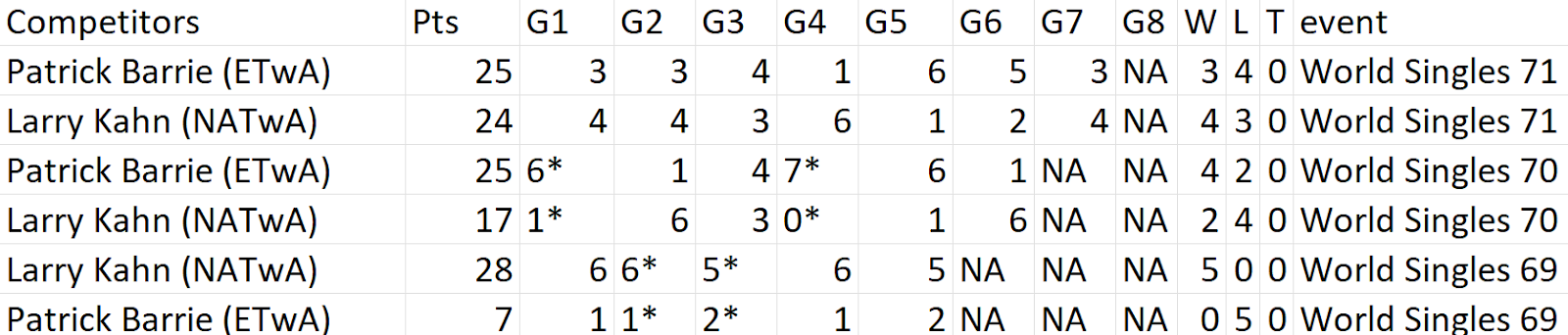
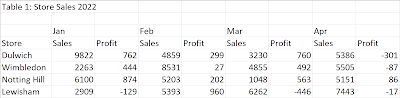
Solution by Tom Prowse and you can download the workflow here . We have another collaboration with #GamesNightViz and this time we are looking at the game of tiddlywinks! Step 1 - Extract & Parse First we need to input our data, then we can extract the Event ID from the Event field. To do this, we want to duplicate the Event field, then use the Clean functionality to Remove Letters and Trim Spaces. From here we can turn the data type into a Whole Number and rename to Event_ID. After the Event ID we can then parse the Competitor and Association. Both of these pieces of information are within the Competitors field and we need to utilise the Split functionality to extract the information. To split off the competitor name, we can use a custom split on all values with '(' as a separator. This allows us to have 2 new fields - Split 1 contains the Competitor name, Split 2 contains the association. We can tidy these up a bit by renaming Split 1 to Competitor Name a...