Posts

Showing posts with the label week19

2020: Week 19

Image
This week’s challenge is a follow-up from last week ( Week 18 ) as we want to do some further analysis! Last week we found out how many minutes each player had played. Now we want to do some analysis about what positions they were playing in, and how many goals were scored. We are again going to use the lineup data source from last week, then also add some new data sources: 1. Player List. A list of all players at Liverpool, and their preferred position group. The numbers at the start of the string is their squad number, and not the position number from the lineup table. 2. Position List.  This provides us with data about the formations that Liverpool have used, and how these player numbers mapped to positions and position types. Requirements Input the following:  Your Week 18 Workflow Player List  Position List All of these can be downloaded here . We require two outputs this week; they have been broken down here: Output 1 Calculate...
2019: Week 19 Solution

Image
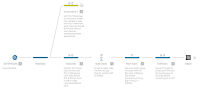
You can find our full solution workflow below and download it here ! The full solution workflow. There are two main ways to convert the [Time] and [Gap] fields into seconds and I’ve decided to highlight both for this solution post, as well as putting both in the solution workflow (as seen above). Use String functions within a single calculated field This is my preferred method, but it requires you to know how far into each field the desired numbers lie. To make this easier for myself I first used the Clean options to filter out all Letters, Punctuation, and Spaces. Use the LEFT() function to obtain the hours, the MID() function to obtain the minutes, and the RIGHT() function to obtain the seconds.  Use the  INT() function to convert these into integers. Multiply the hours by 3600 (60*60) and the minutes by 60. Add them all up and use ZN() to convert any NULLs to zeros. You can see the full formulas below. [Time (secs)] [Gap (secs)] ...