Posts

Showing posts with the label week38

2021: Week 38 - Trilogy
Image
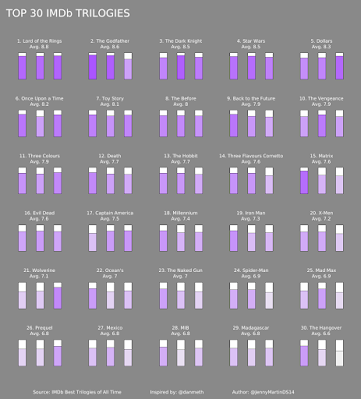
 Challenge By: Jenny Martin Recently, I've been playing with data about the best movie trilogies of all time, according to IMDb. So I thought I'd create a Preppin' Data challenge to allow you all to do the same! View on Tableau Public Inputs There are 2 inputs for this challenge: Top 30 Trilogies  Films  Requirements Input the data Split out the Number in Series  field into Film Order  and Total Films in Series Work out the average rating for each trilogy Work out the highest ranking for each trilogy Rank the trilogies based on the average rating and use the highest ranking metric to break ties (make sure you haven't rounded the numeric fields yet!) We have noticed a slight error in the way that Tableau Prep is calculating this rank, so don't worry if your output is different to ours, we are investigating! Remove the word trilogy from the Trilogy field Bring the 2 datasets together by the ranking fields Output the data Output 7 fields Trilogy Ranking Trilogy Tr...

2020: Week 38

Image
Challenge by Tom Prowse This week we are going to have a bit of fun and taken inspiration from one of the Alteryx Weekly Challenges. For this week's challenge we want to build a workflow that will allow us to identify whether two words are anagrams of each other.  We have selected some words that are related to Tableau Prep & Preppin Data, so can you tell if they are anagrams or not? Input One file with two tables:  1. Words - the list of words to determine whether they are Anagrams or not. 2. Scaffold - this is an optional input to use if you need it! Requirements Input the Data Determine whether the words are Anagrams. There are the following rules:  Anagrams are formed by re-arranging of another word (on the same row) All anagrams are one word only No letter can be used more than once All letters must be used Output Data Output One Table:   Three Fields Word 1 Word 2 Anagram? 12 Rows (13 including headers) After you finish the challenge make sure to fill in t...

2019: Week 38 Solution

Image
You can view our full solution workflow below and download it here ! Our full solution workflow. There are 3 aggregations required for this challenge. We’ll tackle the easier two first. Aggregate to get the total patient visits and first visit dates After importing the data simply create a new aggregation step with the following settings: GROUP on [Patient ID] COUNT DISTINCT [VisitID] fields and rename to [Total Patient Visits]. You could also SUM the [Number of Rows] field for this. Take the MIN of [Date of Service] and rename to [First Visit Date]. Aggregating to get the total patient visits and first visit dates. This gives us the [Total Patient Visits] and [First Visit Date] s for each patient. We can now set this to one side whilst we go back and perform the last aggregation required. Use a self-join & aggregation to number the visits. We now need to number each patient’s visits so that their first visit is number 1, second visit is number 2, an...