Posts

Showing posts with the label week36

2021: Week 37 - Re-looking at Phone Contract Revenue
Image
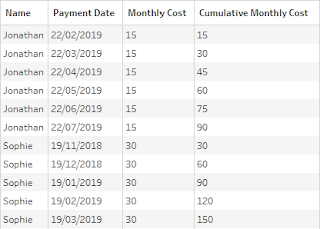
Challenge by Tom Prowse The latest version of Tableau Prep was released this week! This included a great new feature that allows you to generate new rows that aren't already available within your data set. If you want to know more then check out Carl's blog post where he has this covered! As there's a new feature that makes our lives that little bit easier, I thought it would be a great opportunity to revisit one of the older challenges to see how things have changed. Therefore this week we are nearly going all the way back to where Preppin' Data began... Challenge 2019 Week 3!  If you haven't completed this challenge then you can find the original post here , but for the challenge we are going to calculate the recurring revenue based on a mobile phone contract length. This can be completed in the new version of Prep (2021.3 onwards) or an older version if you haven't had the opportunity to download it yet (better yet, why not try both!).  Scenario You work for...

2021: Week 36 - What's Trendy?

Image
 Challenge By: Jenny Martin For this week's challenge, I wanted to use Google Trends to take a look back over the past couple of years and see what people were searching for. In particular, are these categories still as popular now as they were in peak lockdown? How does the experience vary around the world? We'll be looking at: Pet adoption (who didn't want a furry work from home buddy?!) Online streamer (can one make money from playing video games?) Staycations (everyone's favourite word, right?) Inputs There are 2 inputs this week: Timeline - indexes for how popular the term is  Country Breakdown - the percentage of these terms popularity in each country  Requirements Input the data Calculate the overall average index for each search term Work out the earliest peak for each of these search terms For each year (1st September - 31st August), calculate the average index Classify each search term as either a Lockdown Fad or Still Trendy based on whether the average inde...

2019: Week 36 Solution

Image
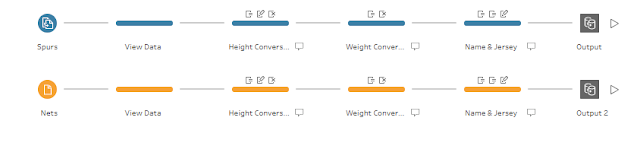
You can view our full solution workflow below and download it here ! Our full solution workflow. 1.   Convert the height for the Spurs. Firstly, we’re going to create the height conversion step. There’s a number of different ways to convert the feet & inches into meters here. An easy method is as follows: Remove all punctuation from [HT] using the relevant Clean option. Use an automatic split to split [HT] into [Feet] (split 1) & [Inches] (split 2). Calculate the [Height (in)] (height in inches) using: [Feet] * 12 + [Inches]. Convert this to [Height (m)] (height in meters) using: [Height (in)] * 2.54 / 100. We divide by 100 as without it we actually have the height in centimetres. Round this to 2dp using the ROUND() function. After this, make sure to remove the original [HT] fields as well as all the unnecessary fields created along the way. 2.   Convert the weight for the Spurs. We’re now going to create the weight conversion step. Ther...