Posts

2022: Week 36 - Calendar Conundrum
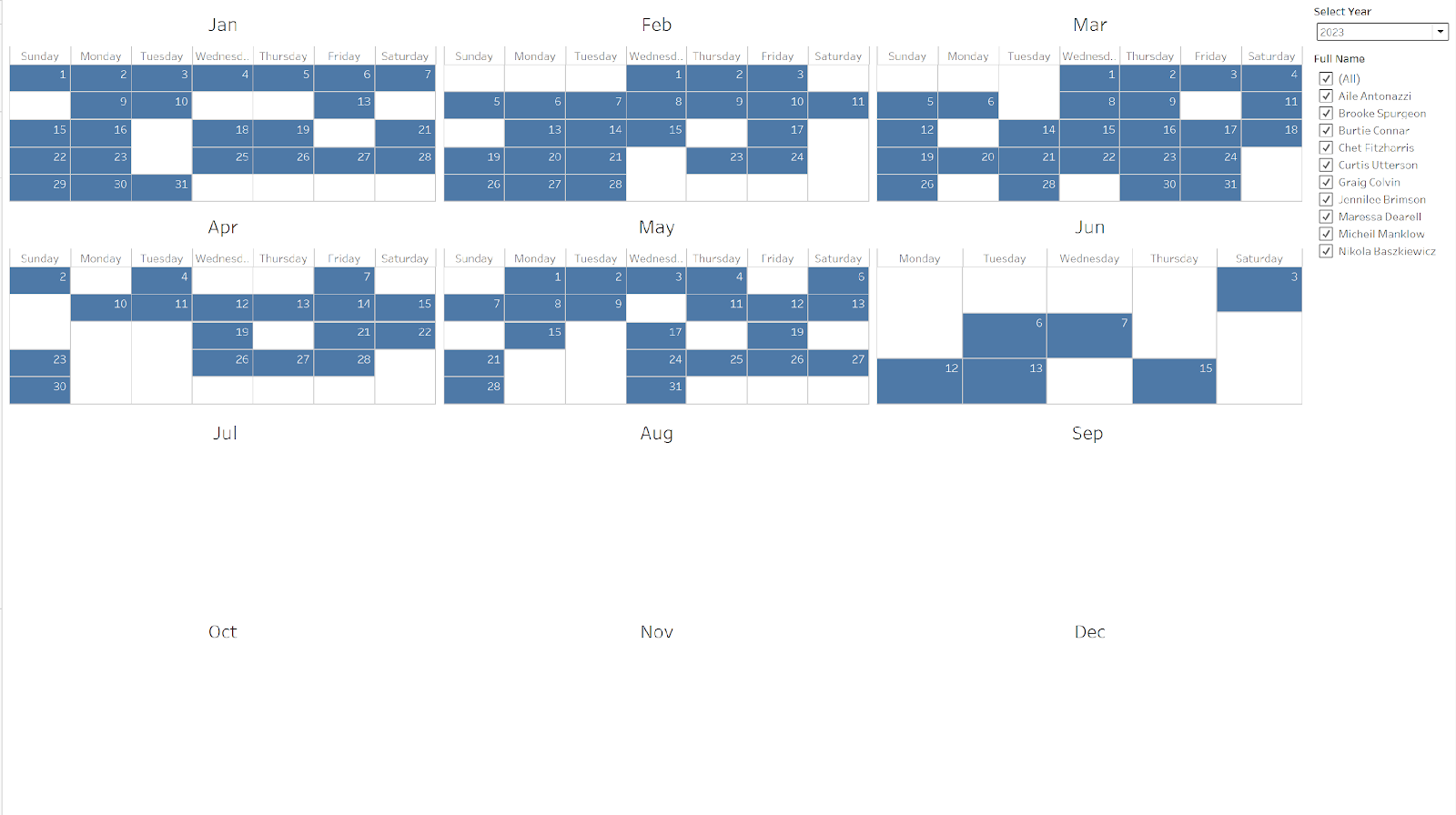
Image
Challenge by:  Jared Flores After beginner and intermediate months, it felt like time to give Carl a break! So here's a challenge submitted by Prep Star Jared: As part of managing your store, you need to know which days you have coverage and which days you still need to schedule. When plugging your data into Tableau to create a calendar, you get this view because you’re missing dates: We need to modify the data so that even dates with no coverage show in the view: Input Employees and their scheduled dates   Requirements Input the data The main challenge is to solve this using only employee_data input Create a Calendar Table Create a date range for the calendar This should be dynamic to handle new data The start of the range should be the based on the year of the earliest date If earliest date is 06/01/2021, the start date should be 01/01/2021 The end of the range should be the last day of the year for the latest date in the data set If the latest date is 06/01/2022 , the end d...

2022: Week 35 - Solution

Image
  Solution by Tom Prowse and you can download the workflow here . This week is an extension to week 34, and we used the same data source to take our analysis a bit further by focussing on the overall performance from spin classes. We want to find some key stats to help us compare against the previous year. Step 1 - Split & Convert The first step this week is to prepare the data so that we have the correct metrics in our table. We did a similar task last week where we want to split the F5 field using a '-' so we get a column for Coach, Calories, and Music Type.  We can then rename the Value field to Mins and remove Units, Type, and F5. At this stage our table should look like this: Step 2 - Calories & Speed Next we can calculate the Calories per Minute using this calculation: Calories per Minute  [Calories]/[Mins] Then we need to convert our dates into just years. This can be done by using the Convert Dates functionality within Tableau Prep.  Then we need to c...

2022: Week 35 C&BSCo Summary Stats

Image
 Created by: Carl Allchin The CEO was delighted to be able to analyse their individual Spin Classes last week. Now they would like to understand their overall performance. Their cycling equipment doesn't capture speed so you will need to guess their average pace.  Input One csv file (same as last week) Requirements Input data Merge km's and min's as Minutes Split the unnamed column into Coach Calories Music Type Convert the Dates to Years Create a parameter to let the user select any speed as the average riding speed (KPH) Your values may differ depending on my average speed (I used 30 kph) Create the following aggregations Total Minutes Total Minutes per Coach (find the most minutes per Coach) Calories per Minute per Coach (find the max calories per minute per Coach) Avg. Calories per Ride Total Rides Total Distance ((Mins/60)*Speed Parameter) Avg. Calories per Minute  Combine all the answers and restructure your data if necessary Output the data Output Using 30KPH as t...

2022: Week 34 - Solution

Image
Video Solution -  Solution by Tom Prowse and you can download the workflow here . This week we have a deeper dive into using Parameters in Tableau Prep and how we can use them to make different selections when filtering our data. We are looking at the different rides from some Spin Classes where we want to know the top rides for different coaches and music types. Step 1 - Clean Metrics The first step is to clear up the table so that we have the correct metrics. First we need to rename Value to Mins then we can remove the Units and Type fields. This will give us the duration of each ride.  Next, we need to split apart the F5 field to get the information about the Coach, Calories, and Music Type. We can do this by splitting all values on '-': After the split we can rename the fields so our table should look like this:  The last task we need to do in this step is to make sure the Music Type is in Title Case (we covered this a couple of weeks ago in a challenge!). The calcula...

2022: Week 34 - C&BSCo Parameters, Parameters, Parameters

Image
 Created by: Carl Allchin The CEO of Chin & Beard Suds Co has a challenge for you... but it's not exactly work related!  They want you to create an application that will allow them to analyse their Spin Classes. They've collected all of their data but just want to know their top rides for different coaches and music types. As CEO, they also expect to be able to pick the number of entries returned too!  Input One csv file Requirements Input data Merge Km's and min's as Minutes Change 'Value' to Mins Split up the unnamed column into: Coach Calories Music Type Change Music Type values to be Title Case (first letter of each word is capitalised) Create three parameters: Music Type Coach Top N  Create a way to return the Top N value selected and order the file with the highest calories burnt at the top Create filters so only the parameter selection remains in the output data set For Top N parameter it's all the values up to that number Output the data but use ...

2022: Week 33 - Solution

Image
Solution by Tom Prowse and you can download the workflow here . The challenge this week is to try and identify how long there is between each of the orders for each product and location. There were some different answers across social media with different tools and different solutions... but this is how we solved it! Step 1 - Input Tables The first step is to input all of our data sources and combine them so we have a single table. First we can focus on the two orders tables and combine these using a Union . Once we union the two tables together, we need to ensure that the mismatched date fields (Sales Timestamp & Sales Date) are merged together into the same field. We can do this by selecting Sales Timestamp and then using the + icon on the Sales Date row to merge these together. After merging the fields, we then want to replace any null values with Online. This will be in the Store field and nulls are created as this field isn't present within the Online orders table. All we ...

2022: Week 33 - C&BSCo Next Sale

Image
 Challenge by: Carl Allchin This is the midpoint of our month of Intermediate challenges building on from the challenges in beginners' month.  This week's challenge will again test your problem solving skills but I expect lots of different ways to achieve the same output (especially in different softwares). Remember to plan your path through the challenge to help you keep on task and not going off on tangents.  We have collected the sales data for two stores and our online shop from the start of the year for a few weeks. We'd like to know how long between the orders of each of the types of products in the different locations.  Input There are 3 inputs this week: Input 1 - Product Lookup Input 2 - Instore Sales Input 3 - Online Sales Requirements Input the data sets Link the Instore and Online sales together to be one data source Call the Nulls in the Stores field Online  Link in the product Lookup to name the products instead of having their ID number Create th...